
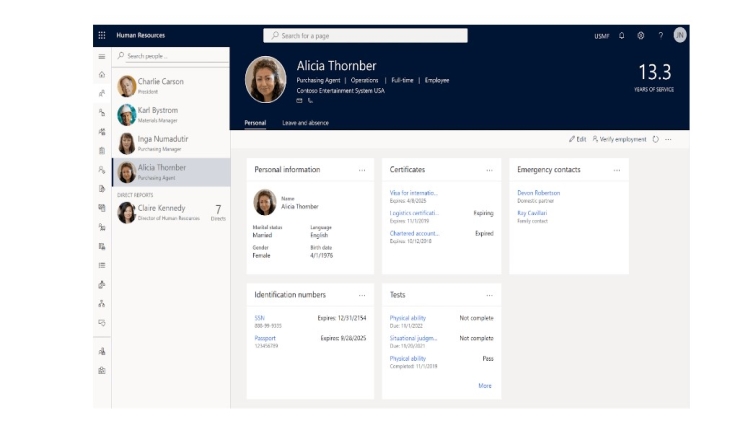
Maintaining an effective and streamlined approach to human resources (HR) management is critical in the ever-changing world of corporate operations. Organisations frequently resort to technology solutions that enable complete HR management and smooth migration procedures to stay competitive and satisfy the dynamic demands of a contemporary workforce.
Microsoft Dynamics 365 provides a robust set of solutions targeted to these needs, with Dynamics 365 Human Resources (HR) and Dynamics 365 Finance & Operations (F&O) at the forefront. We will look at how you use the features of Dynamics 365 F&O to launch your Dynamics 365 Human Resources migration journey.
Understanding Dynamics 365 Human Resources and F&O
Dynamics 365 Human Resources: This product is intended to help businesses build a more engaged, connected, and agile workforce. It makes HR operations, benefits administration, payroll, compliance, and other tasks easier to manage. Dynamics 365 HR’s user-friendly interface and extensive capabilities allow organisations to focus on strategic HR management while optimising day-to-day operations.
Dynamics 365 Finance & Operations: Formerly known as Dynamics AX, Dynamics 365 Finance & Operations (F&O) is a powerful enterprise resource planning (ERP) system that integrates financial and operational activities. Finance, supply chain management, manufacturing, and retail are all covered. Dynamics 365 F&O’s complete features make it an ideal partner for Dynamics 365 HR during the conversion process.
Why Consider Migration?
Migrating to Dynamics 365 Human Resources provides several advantages, including greater employee management, increased communication, and lower administrative cost. The migration procedure, on the other hand, might be complicated, comprising data movement, configuration setting, and interaction with current systems. This is where the integration of Dynamics 365 HR and Dynamics 365 F&O comes in handy.
Leveraging Dynamics 365 F&O for Migration
1. Data Migration:
A successful migration begins with a seamless transfer of existing HR data. Dynamics 365 F&O’s data migration capabilities come into play here. By leveraging its data import and export tools, organisations can ensure that employee records, payroll data, benefits information, and more are accurately migrated to the new Dynamics 365 HR environment.
2. Integration:
Dynamics 365 F&O can integrate seamlessly with other Microsoft solutions and third-party applications. During the migration process, this means that organisations can ensure the continuity of other business processes, such as financial management and supply chain operations, while implementing Dynamics 365 HR. This integration guarantees that the HR migration does not disrupt the overall business flow.
3. Unified Platform:
The synergy between Dynamics 365 HR and Dynamics 365 F&O lies in their common platform, enabling a holistic approach to HR and business management. Organisations can gain a comprehensive view of employee data, financials, and operations, leading to more informed decision-making.
4. Customization:
Each organisation has unique HR requirements. Dynamics 365 F&O’s customizable features enable organisations to tailor the HR solution to their specific needs. From configuring payroll calculations to defining employee roles, Dynamics 365 F&O provides the flexibility necessary for a successful migration.
5. Streamlined Processes:
By utilising Dynamics 365 F&O automated workflows and process optimization features, organisations can ensure that their HR processes are efficient and error-free. This not only boosts productivity but also enhances employee experience by reducing administrative burdens.
Key Steps in Dynamics 365 HR Migration with Dynamics 365 F&O
1. Assessment and Planning:
Understand your current HR processes, identify pain points, and define your migration goals. Determine the data that needs to be migrated and establish a clear migration strategy.
2. Data Preparation:
Cleanse and organise your existing HR data to ensure accurate migration. Dynamics 365 F&O’s data import tools can aid in this process.
3. Configuration and Customization:
Leverage Dynamics 365 F&O’s customization capabilities to configure the Dynamics 365 HR solution according to your organisation’s needs.
4. Integration Setup:
Ensure that Dynamics 365 F&O is seamlessly integrated with other relevant systems, such as financial management, to maintain overall business continuity.
5. Data Migration:
Utilise Dynamics 365 F&O’s data migration tools to transfer employee records, payroll data, benefits information, and more to Dynamics 365 HR.
6. Testing:
Thoroughly test the migrated data and processes to identify and address any discrepancies or issues.
7. Training and Adoption:
Train your HR team and employees on the new Dynamics 365 HR system to ensure smooth adoption and effective utilisation.
8. Go-Live and Support:
Execute the migration and monitor the system’s performance post-migration. Provide ongoing support to address any concerns or questions.
Summing up
Migrating to Dynamics 365 Human Resources provides an exceptional chance to improve HR management and empower your team. The migration process may be optimised, fast, and smooth by leveraging the features of Dynamics 365 Finance & Operations. The integrated strategy ensures that your whole business operations are unaffected as you improve your HR processes.
As you begin this migration journey, keep in mind that rigorous planning, data preparation, and communication between your HR and IT departments are critical to a smooth transfer. You’re not just moving with Dynamics 365 HR and Dynamics 365 F&O; you’re reinventing your HR management for the future.
